LatLonger1.1
Publisher Description
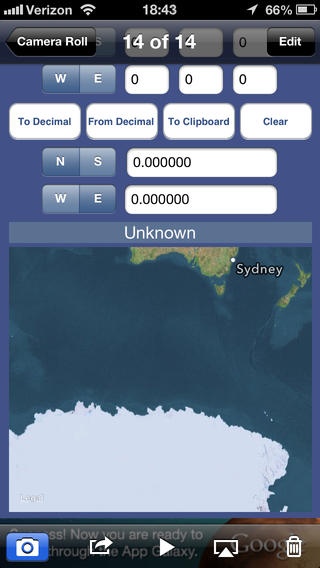
LatLonger quickly converts latitude and longitude from degrees, minutes and seconds to decimal degrees and back and instantly displays those coordinates on a map.
Why You Need LatLonger
Latitude and longitude can be specified in either the traditional format of degrees, minutes and seconds; or in the newer format of decimal degrees. Most popular map websites use the format of decimal degrees.
- If you key traditionally formatted geo-coordinates into popular map websites without converting them, the wrong location will display.
- Even if you perform the math calculation yourself, you would then need to key in that calculation to display the location on a popular map website.
Lat-Longer does all that for you on one ingenious screen.
Additional Use for PC Photography!
Have you ever taken photos with your iPhone but can t remember the location? If you turned on Location Services, the latitude and longitude of each photo is collected and stored in the GPS metadata. When viewing the photos on the PC, the metadata are found in Properties > Details > GPS. However, the format used by the PC is degrees, minutes and seconds. LatLonger calculates to decimal degree format and displays it for you on a map. You easily see the correct location of your photo.
Easy to Use
1. Start LatLonger.
To Convert to decimal notation:
2. Type in the latitude and longitude using separate fields for degrees, minutes and seconds in the fields toward the top. Degrees and minutes will always be whole numbers. Seconds can be entered with a decimal point if necessary.
3. Press the N or S button to specify whether the coordinate is North or South latitude; press the W or E button to specify West or East longitude. (LatLonger defaults to North latitude and West longitude, suitable for the North American continent.)
4. Press "To Decimal". The geo-coordinates are displayed in decimal degrees, and it is simultaneously mapped if a network is available.
To Convert from decimal notation:
2. Type in the latitude and longitude using decimal notation in the fields toward the bottom.
3. Press the N or S button to specify whether the coordinate is North or South latitude; press the W or E button to specify West or East longitude. (LatLonger defaults to North latitude and West longitude, suitable for the North American continent.)
4. Press "From Decimal". The geo-coordinates are displayed in degrees minutes and seconds, and it is simultaneously mapped if a network is available.
5. You may zoom in or zoom out on the map.
Requires iOS 6.1 or later. Compatible with iPhone, iPad, and iPod touch.
About LatLonger
The company that develops LatLonger is Gardner von Holt. The latest version released by its developer is 1.1. This app was rated by 1 users of our site and has an average rating of 2.0.
To install LatLonger on your iOS device, just click the green Continue To App button above to start the installation process. The app is listed on our website since 2011-02-03 and was downloaded 69 times. We have already checked if the download link is safe, however for your own protection we recommend that you scan the downloaded app with your antivirus. Your antivirus may detect the LatLonger as malware if the download link is broken.
How to install LatLonger on your iOS device:
- Click on the Continue To App button on our website. This will redirect you to the App Store.
- Once the LatLonger is shown in the iTunes listing of your iOS device, you can start its download and installation. Tap on the GET button to the right of the app to start downloading it.
- If you are not logged-in the iOS appstore app, you'll be prompted for your your Apple ID and/or password.
- After LatLonger is downloaded, you'll see an INSTALL button to the right. Tap on it to start the actual installation of the iOS app.
- Once installation is finished you can tap on the OPEN button to start it. Its icon will also be added to your device home screen.
